What Does the D3D11_INIT Error Mean?
The D3D11_INIT error (or a similar Direct3D initialization failed message) occurs when the system or application cannot create a graphics context via Direct3D 11. This typically manifests when launching games, professional graphics software, or media players. Instead of launching, a pop-up window with the error text appears, and the application terminates. The issue is related to the Windows graphics pipeline and can have both software and hardware causes.
Causes
- Outdated or corrupted graphics drivers — the most common cause. Drivers may not support the necessary Direct3D 11 features or conflict with the system.
- Corruption of DirectX or .NET Framework components — missing or damaged system libraries required for the graphics API.
- Conflict with other software — screen recording tools (OBS, Fraps), overlays (Discord, Steam), or antivirus software can intercept graphics calls.
- Hardware issues with the graphics card — overheating, physical damage, or insufficient video memory (VRAM).
- Insufficient permissions or security conflict — the application is launched without administrator rights, or the system blocks GPU access.
- Outdated Windows version — missing latest updates, including DirectX packages.
Solution 1: Update Graphics Drivers
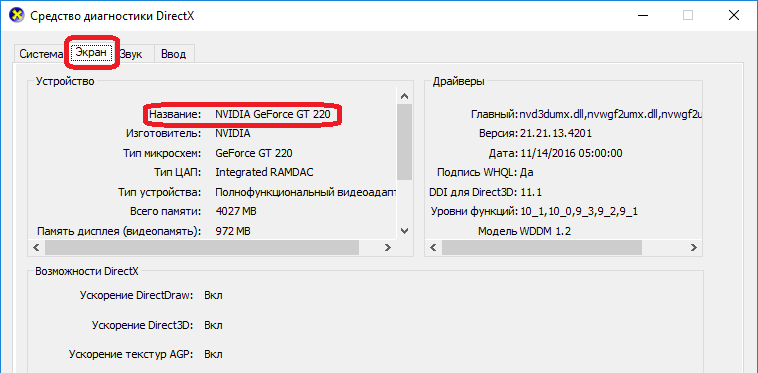
dxdiag utility: 'Display' tab
Properly installed and up-to-date drivers are essential for stable Direct3D operation. Standard Windows updates often don't provide the latest versions, so manual installation is required.
- Identify your graphics card model:
- Press
Win + R, typedxdiag, and press Enter. - Navigate to the "Display" tab. The model is listed under "Device" (e.g., NVIDIA GeForce RTX 3060).
- Press
- Download the driver:
- Visit the manufacturer's official website (NVIDIA, AMD, or Intel).
- Select your model, operating system, and download the latest driver version.
- Install the driver:
- Run the installer and choose "Custom Installation" → "Graphics Driver".
- After installation, restart your computer.
💡 Tip: If a standard installation doesn't help, use DDU (Display Driver Uninstaller) in Safe Mode to completely remove old drivers before installing new ones.
Solution 2: Check and Repair System Files
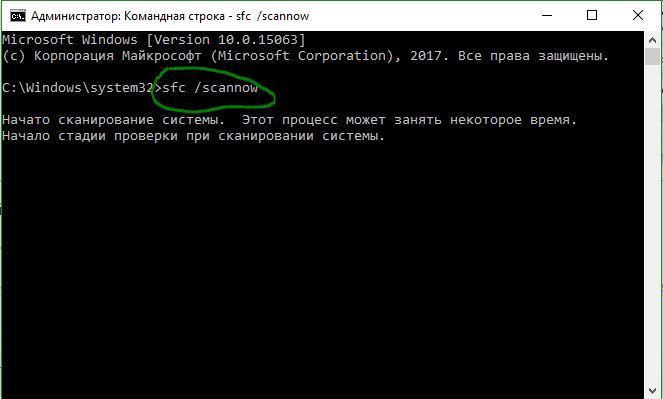
Running sfc and DISM commands in Command Prompt
Corruption of DirectX, C++ redistributable components, or Windows system libraries can block D3D11 initialization.
- Open Command Prompt or PowerShell as an administrator.
- Run the system file integrity check:
The process will take 10-20 minutes. If corruption is found, the system will attempt to fix it.sfc /scannow - After
sfccompletes, run the system image restore:DISM /Online /Cleanup-Image /RestoreHealth - Restart your computer and check if the error persists.
Solution 3: Disable Hardware Acceleration in the Application
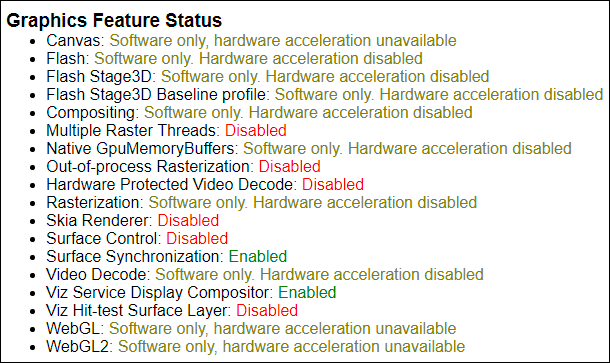
Disabling hardware acceleration in Chrome
Some applications (especially browsers or older programs) may use the GPU incorrectly. Disabling hardware acceleration will force them to use software rendering.
- In browsers (Chrome, Firefox, Edge):
- Open
Settings→System(orPerformance). - Disable the "Use hardware acceleration when available" option.
- Restart the browser.
- Open
- In other programs:
- Look in the application's settings (usually
Settings→GraphicsorPerformance) for an option related to GPU or Direct3D and disable it. - If no such option exists, try launching the program with the
--disable-gpuflag (for some applications).
- Look in the application's settings (usually
Solution 4: Reinstall DirectX
Although DirectX 11 is built into Windows 10/11, some components (like DirectX 9 or C++ libraries) may be missing or corrupted.
- Download DirectX End-User Runtime from the official Microsoft website: DirectX End-User Runtime Web Installer.
- Run the installer and follow the instructions. It will install missing DirectX 9, 10, and 11 components.
- Restart your computer after installation.
Solution 5: Check Hardware and Overheating
If all software methods fail, the problem may be hardware-related.
- Check your graphics card temperature:
- Use utilities like HWMonitor or MSI Afterburner.
- Under load (game, stress test), GPU temperature should not exceed 85–90°C.
- Clean the cooling system:
- If the computer hasn't been cleaned in a while, dust-clogged radiators and fans can cause overheating and throttling.
- Check video memory (VRAM):
- Run a memory test with MemTest86 or the built-in test in Valley Benchmark.
- Errors may indicate GPU or memory failure.
Prevention
- Regularly update your graphics drivers — check for updates monthly.
- Install Windows updates — many packages contain fixes for DirectX and the graphics stack.
- Avoid "cracked" or modified drivers — use only official releases.
- Monitor system temperatures — ensure good case ventilation and clean dust regularly.
- Don't disable your antivirus permanently — some malware can damage DirectX system files.